Studio
A folder goes in,
something you can use comes out.
Soar is classroom software that installs on your computer. This page covers only the studio — the part in charge of making the thing.
It won't write a number your material doesn't have.
Documents, slides and sheets all run off the same set of material, and when one is finished it goes straight to the class.
“Let the AI write the whole page” is gone
An early version had a third option, “free layout”: hand the AI one sentence and it wrote the whole page. It looked like the most flexible of the three. It never actually received the material — what went across was that one line of instruction, plus a short slice cut off the front of it. Taken out in August 2026.
The path that stayed is the other one: inside the deck editor, take a page that is already there and rework it into a free layout. Every word of the original page has to appear in the new one, word for word; anything short of that is refused outright.
Coming in
One folder, structure and all
Pick a folder and the whole directory tree comes in at once, subfolders kept exactly as they are. PDF, Word, PPT, Excel and plain text are all read. Word and PPT go through the Office on your machine and become PDF first, so the original keeps its look; when that conversion won't run, they fall back to an editable document — and it says outright that this copy is not the original.
Twelve levels of subfolders at most, twenty thousand files, 25MB per file and 256MB in one pass. Anything over the limit or not recognized is listed line by line on the receipt rather than vanishing quietly; a shortcut pointing outside the folder is refused.
Second pass, only what changed
Point at the same folder again: new files are added, changed ones are updated in place — no second copy appears, and nothing you have already arranged gets shuffled. Files that did not change are skipped.
Deleting a file back in the folder does not delete the one in your library along with it. This link runs one way only.
What comes out
One material, three forms
Documents, slides and sheets each have their own generate window, and all three take the same kinds of material: text you pasted, files you picked, anything dropped into the box, or teaching material you have already uploaded, pulled straight from there.
Documents come with eleven genres to choose from, or you can let it work out which one fits; decks start with a plan first — what each page covers and in what order — and you edit that before you press generate.
It won't write a number your material doesn't have
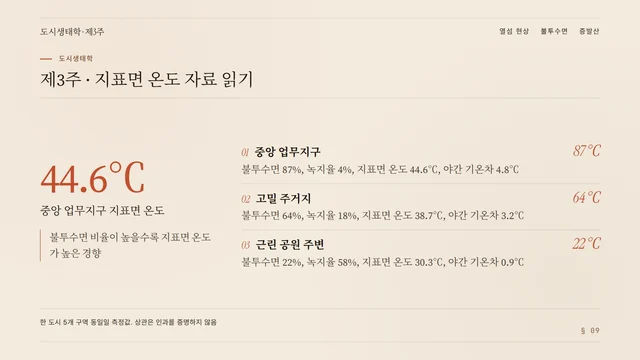
When the AI builds a sheet, every single number in it has to be findable word for word in the material you gave it. If one is not there, it refuses to produce the sheet on the spot.
On the document side the same rule takes another shape: every source superscript it generates is checked back against the original text, one by one, in code. When one does not match, it would rather leave the mark off than point at the wrong place.
Material
The sheet the AI built
| Zone | Impervious | Surface temp. |
|---|---|---|
| Central business district | 87 | 44.6 |
| High-density residential | 64 | 38.7 |
| Around the neighborhood park | 22 | 30.3 |
This material is editable. Try deleting 44.6.
Looking right and being right are two different things.
Editing
The AI's edits and yours take the same path
Say “make the title on page three shorter” and it does it; click into the text on the canvas and change it yourself, and what lands is the same set of operations — so both sides behave the same way, and both can be undone.
A change comes as a preview first: which pages moved, and what they look like now. Nothing reaches the deck itself until you press accept.
What it can't do, it says so
There are eight things the AI plainly cannot do, written into its own instructions, and each one comes with something to do instead — font size, for instance, is set automatically from how much content is on the page, so if you want the words to look bigger, put two fewer lines on it.
Each of the eight also carries a check that runs the other way: the day font size really does become a control you can set, that check goes red and reminds us to rewrite this sentence.
Editable after generation, and exportable
Tell the AI in one sentence to change the layout; decks export as genuinely editable PPTX (real shapes, not screenshots), and tables come with a formula bar.
Atmospheric backgrounds and vector art turn into images; fonts are swapped for the handful that are certain to exist on the other machine — once it opens, you may want to give it one more look.
Back to class
What you made goes straight to the class
Press “publish to the classroom” on the course page and what students get is that same copy; during class you can also pull a piece straight from the studio, and opening it broadcasts it — students follow to the same page on their own.
The way back is open too: one tap on the course page, “open in the workspace,” and you are back in the studio carrying on where you left off.
Your material, turned into something you can use
What isn't in the material, it doesn't write. What it can't do, it says so. And every change is something you see before you decide.